
Last checked October 25, 2026
TikTok Shop LIVE analytics means reading a stream’s GMV, units sold, viewers and product sales, during or after the LIVE. For your own streams, the TikTok Shop LIVE dashboard gives you these numbers as the LIVE runs and after it endsT1. For anyone else’s streams, use a LIVE tracker such as FastMoss, which estimates GMV and viewers for each session and lists the products it soldF1.
Below is how to analyze a LIVE step by step, with a real US beauty LIVE from October 2026. Every number has a source at the bottom of the page.
The short answer
Open the LIVE in a tracker, read GMV and viewers, then divide GMV by viewers and look at which products sold. On October 15, 2026, a CANVAS Beauty LIVE on TikTok Shop US made $76,992.18 in GMV from 30,405 viewers in 148 minutesF1.
Look up any TikTok Shop LIVE in FastMoss. Basic starts at $29 for the first monthF3.
Where to find TikTok Shop LIVE analytics
| Source | What it shows | Whose streams | Cost |
|---|---|---|---|
| LIVE dashboard | During-LIVE and after-LIVE metrics, traffic sources, a conversion funnel and product-level performanceT1 | Your own LIVEs | Free |
| Seller Center shop analytics | LIVE GMV for your shop, with affiliate LIVE GMV shown separatelyT2 | Your own shop | Free for sellers |
| FastMoss LIVE search | Estimated GMV, units sold, viewers, peak viewers and products sold for each session | Any US stream it tracks | From $29 for the first monthF3 |
| Watching the LIVE | The host, the offers and the product order | Any stream | Free |
The LIVE dashboard is the most detailed source for your own streams. It also compares your weakest metrics with the market average and lets you replay the LIVE next to the trend chartT1. It cannot show you a competitor’s stream. That is the gap a LIVE tracker fills. To track a competitor’s next LIVEs while they are still on air, add the host to the TikTok LIVE monitor in FastMoss. It records viewers, units sold, GMV and new followers during each sessionF8. Monitoring credits depend on your planF8.
The LIVE metrics that matter
- GMV. What buyers paid for products in the LIVE. TikTok Shop counts LIVE GMV by payment time and includes canceled and refunded ordersT2.
- Units sold. How many items sold. GMV divided by units gives the average a unit, which shows whether buyers picked cheap add-ons or full-price products.
- Viewers. How many people entered the LIVE. Peak viewers tells you how many were there at once.
- GMV per viewer. GMV divided by viewers. It lets you compare a small LIVE with a big one.
- Products sold. Which products carried the session, and how many in the cart sold at all.
How to analyze a LIVE in FastMoss
- Find the LIVE. Open TikTok LIVE search, set the market to the United States and the date range. Filter by units sold or GMV, or search for a host.
- Check who is selling. Open the shop and confirm it is a US local shop. A host can be a brand account or an affiliate creator.
- Read the core numbers. Note GMV, units sold, viewers, peak viewers and duration.
- Work out the ratios. Divide GMV by viewers, and GMV by units.
- Open the product list. Sort by GMV and see how much the top few products made.
- Compare sessions. Look at the same host’s other LIVEs over the same weeks, or a competitor’s LIVE with similar products.
Example: a CANVAS Beauty launch LIVE, October 15, 2026
CANVAS BEAUTY BRAND is a US local shop on TikTok Shop that sells body care, rated 4.6 out of 5F6. On October 15, 2026, its own account ran a LIVE called “CANVAS Stocking Stuffer Launch”, starting at 1:02 PM PTF1.
| Metric | October 15, 2026 |
|---|---|
| Duration | 148 minutesF1 |
| GMV | $76,992.18F1 |
| Units sold | 3,041F1 |
| Average a unit | $25.32F1 |
| Viewers | 30,405F1 |
| Peak viewers at once | 2,084F1 |
| GMV per viewer | $2.53F1 |
| New followers | 54F1 |
| Products with sales | 29 of 29F1 |
FastMoss estimates for the US market, checked October 25, 2026.
Which products sold
Every one of the 29 products in the LIVE sold at least onceF1. The top 8 made $49,334.10, about 64% of the session’s GMVF1.
| Product | LIVE GMV | Units sold |
|---|---|---|
| Stocking Stuffer Body Glaze | $9,108F1 | 506F1 |
| (NEW) Body Glaze | $8,178.90F1 | 411F1 |
| Stocking Stuffer Into the Mist Body Spray | $7,725F1 | 309F1 |
| Body Drops | $5,746.20F1 | 366F1 |
| Stocking Stuffer Premium Gold Label Body Glaze | $5,600F1 | 56F1 |
| Stocking Stuffer Dill Breaker Individuals | $4,770F1 | 159F1 |
| Premium Gold Label Body Drops | $4,176F1 | 87F1 |
| Stocking Stuffer Signature Collection | $4,030F1 | 62F1 |
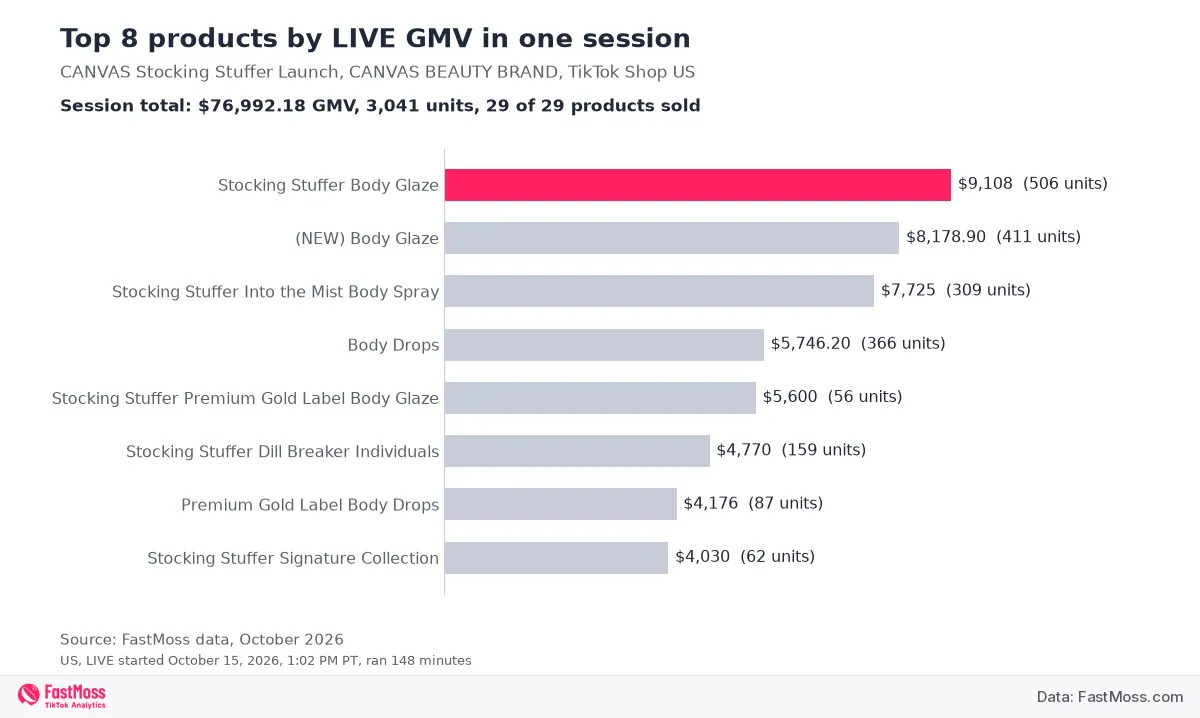
The launch products led. Five of the top 8 carried the “Stocking Stuffer” name, and the stocking stuffer body glaze sold the most, 506 units for $9,108F1. The premium gold label glaze sold only 56 units and still made $5,600, because it averaged $100 a unitF1. A few high-priced items can matter as much as the volume sellers.
The same launch, four days later
CANVAS ran a LIVE with the same title on October 19, 2026, starting at 11:40 AM PTF2. It ran longer and sold less.
| Metric | October 15 | October 19 |
|---|---|---|
| Duration | 148 minutesF1 | 254 minutesF2 |
| GMV | $76,992.18F1 | $24,460.08F2 |
| Units sold | 3,041F1 | 929F2 |
| Average a unit | $25.32F1 | $26.33F2 |
| Viewers | 30,405F1 | 12,941F2 |
| Peak viewers at once | 2,084F1 | 309F2 |
| GMV per viewer | $2.53F1 | $1.89F2 |
| New followers | 54F1 | 9F2 |
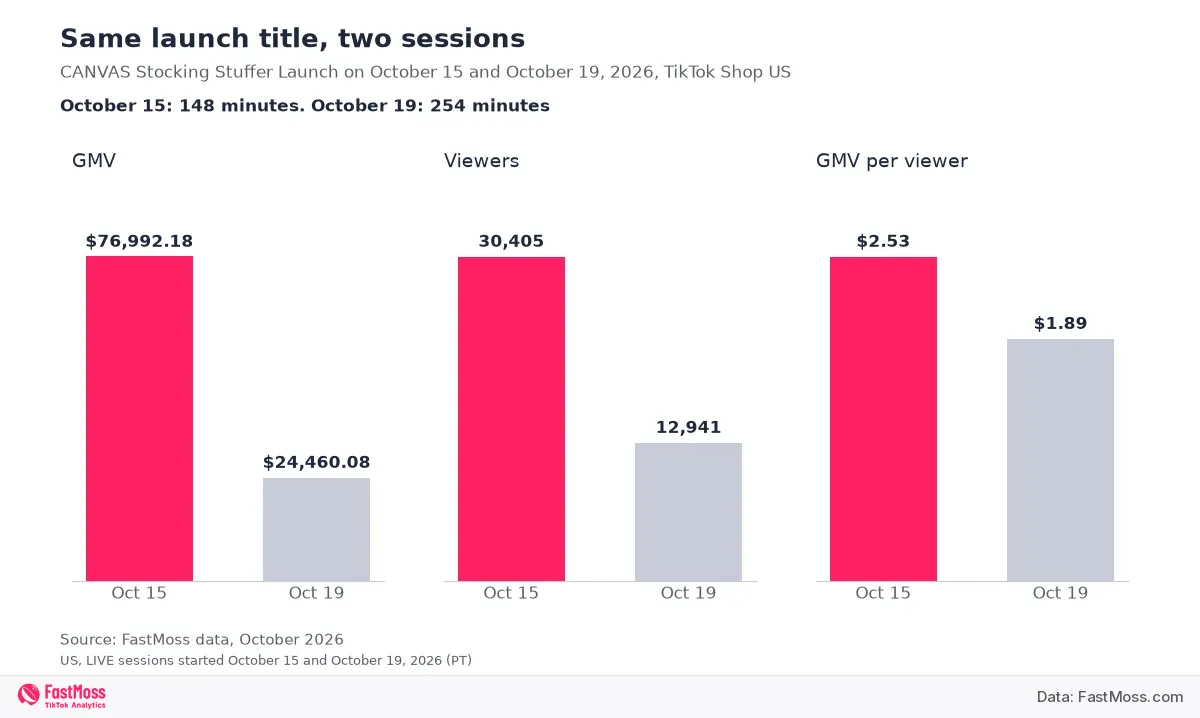
Fewer people came, and fewer of them bought. The first LIVE made about three times the GMV of the second, with more than twice the viewersF1F2. Buyers paid about the same per item, $25.32 against $26.33, so the drop came from traffic and conversionF1F2. Basket size held steady. Peak viewers fell from 2,084 to 309F1F2. A launch draws a crowd once. A repeat needs its own reason to watch, such as a new product or a new offer.
Short can beat long. FastMoss lists 12 US LIVEs that started between October 13 and 19, 2026 and sold at least 3,000 units eachF7. The CANVAS launch was the only one shorter than 13 hoursF7. A focused launch with a clear offer sold at that level in under two and a half hours.
To open the same view for a LIVE in your category, search the host in FastMoss LIVE search. You can also open this CANVAS LIVE in FastMoss.
How to read LIVE numbers without fooling yourself
Check the average a unit
Divide GMV by units sold. If the average is far from the product prices you see in the LIVE, the session may include very cheap items or giveaways, and the units total will look bigger than the sales really were.
Compare like with like
A long auction stream and a two hour launch are different jobs. Compare GMV per viewer and the average a unit, and compare streams that sell similar products.
Know which numbers are estimates
FastMoss estimates LIVE sales from the change in a product’s sold count during the session, multiplied by the priceF4. GMV and period sales are estimates that FastMoss builds from public TikTok Shop dataF5. Use the figures to compare streams. For exact numbers on your own LIVEs, use the LIVE dashboard.
What it costs in FastMoss
| Plan | Billed monthly | History | Category searches a day |
|---|---|---|---|
| Basic | $29 first month, then $49 a monthF3 | 90 daysF3 | 150F3 |
| Pro | $53 first month, then $89 a monthF3 | 180 daysF3 | 300F3 |
| Ultimate | $99 first month, then $139 a monthF3 | Longest of the threeF3 | UnlimitedF3 |
All plan figures from the FastMoss pricing page, checked October 25, 2026. Plans change, so confirm the price at checkout.
Basic covers LIVE search a few times a week, and monitoring credits rise with each planF8. If you track competitors’ LIVEs every day or need longer history, Pro or Ultimate gives you more roomF3. New users get a 7-day free trial on the web plansF9.
LIVE is one channel. To find what to sell on your next LIVE, see how to find trending products on TikTok Shop, and for how the whole US market is moving, read the US TikTok Shop statistics for September 2026. If your hosts are affiliate creators, our guide to becoming a TikTok Shop affiliate explains how that side works. Comparing tools? See our guide to FastMoss alternatives, Kalodata alternatives, FastMoss vs EchoTik or FastMoss vs Kalodata.
Frequently asked questions
Where do I find LIVE analytics for my own TikTok Shop streams?
Use the LIVE dashboard. During a LIVE, open it from LIVE Manager. After the LIVE ends, open Livestream Analytics and pick the LIVE roomT1.
Can I see another seller’s TikTok Shop LIVE sales?
Not in Seller Center, which covers your own account. A LIVE tracker such as FastMoss estimates GMV and viewers for other sellers’ streams, and lists the products sold in each oneF1.
What does LIVE GMV include?
In TikTok Shop’s own analytics, LIVE GMV is the total paid for orders of products in LIVE streams, including canceled and refunded orders, counted by payment timeT2.
What is a good GMV per viewer for a TikTok Shop LIVE?
It depends on price and category, so compare streams that sell similar products. The CANVAS Beauty LIVE on October 15, 2026 made about $2.53 per viewerF1. A repeat of the same launch on October 19 made about $1.89F2.
How does FastMoss estimate LIVE sales?
FastMoss estimates LIVE sales from the change in a product’s sold count during the session, multiplied by the price. When the same product sells elsewhere at the same time, part of the units are credited to the other channels by weightF4. GMV and period sales are estimates that FastMoss builds from public TikTok Shop dataF5.
Does a longer LIVE sell more?
Not always. CANVAS Beauty’s 148 minute LIVE on October 15, 2026 made $76,992.18 in GMVF1. Its 254 minute LIVE with the same title on October 19 made $24,460.08F2.
Which LIVE metrics should I check first?
Start with GMV and viewers, then GMV per viewer. After that, look at which products sold and what each one averaged a unit. Those numbers tell you whether the audience bought and what they bought.
Analyze a TikTok Shop LIVE you are watching
See GMV, viewers and the products each session sold. Basic starts at $29 for the first monthF3.
Sources
- F1 FastMoss LIVE data for CANVAS Stocking Stuffer Launch, CANVAS BEAUTY BRAND, room ID 7696987005191785246, US, started October 15, 2026, 1:02 PM PT, with the product list, https://www.fastmoss.com/live/detail/7696987005191785246, checked October 25, 2026
- F2 FastMoss LIVE data for CANVAS Stocking Stuffer Launch, CANVAS BEAUTY BRAND, room ID 7698450181326523166, US, started October 19, 2026, 11:40 AM PT, https://www.fastmoss.com/live/detail/7698450181326523166, checked October 25, 2026
- F3 FastMoss pricing page and FAQ, monthly prices and plan limits, https://www.fastmoss.com/pricing, checked October 25, 2026
- F4 FastMoss user guide FAQ, how LIVE and video sales are estimated, checked October 25, 2026
- F5 FastMoss homepage FAQ, “Where does the data come from?”, on estimating GMV and sales from public TikTok Shop signals, https://www.fastmoss.com/, checked October 25, 2026
- F6 FastMoss shop profile for CANVAS BEAUTY BRAND, seller ID 7495185597363620303, shop type (local shop) and rating, https://www.fastmoss.com/shop-marketing/detail/7495185597363620303, checked October 25, 2026
- F7 FastMoss US LIVE search, sessions that started October 13 to 19, 2026 (PT) with at least 3,000 units sold, https://www.fastmoss.com/live/search, checked October 25, 2026
- F8 FastMoss TikTok LIVE monitor page, https://www.fastmoss.com/monitor/liveMonitor, checked October 25, 2026
- F9 FastMoss homepage, 7-day free trial on the web plans, https://www.fastmoss.com/, checked October 25, 2026
- T1 TikTok Shop Academy, LIVE Dashboard [PC], https://seller-us.tiktok.com/university/essay?knowledge_id=1152287197103915&lang=en, checked October 25, 2026
- T2 TikTok Shop Academy, How to navigate Shop analytics in Seller Center, LIVE GMV definition, https://seller-us.tiktok.com/university/essay?knowledge_id=813364865828654&lang=en, checked October 25, 2026